I often receive emails from people asking me how to leave a comment on my blog. Most feel silly about asking – but don’t! If you’re new to the world of blogging, these things take a little bit of time to figure out. Plus, every blog is a little different!
I decided that instead of continuing to email each person individually, I’d save a little effort and type it here so that I can simply refer people to this post! Here is how to leave a comment on a post here at Heavenly Homemakers:
- Look at the top and the bottom of each post and you will see the word Comments with a blue number in parentheses beside it. Here’s a screen shot of what this looks like:
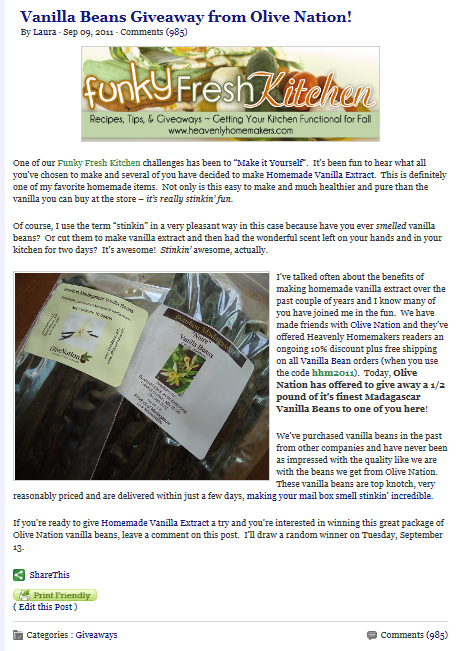
- In the case of our example above, you see that the number is (985). Click on that blue number (whatever it happens to be for that post) and a form will pop up for you.
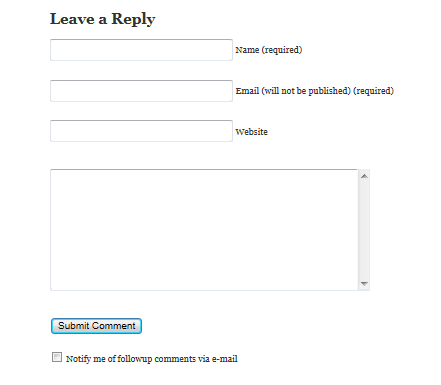
- Fill in the form by putting your name (or a user name like “MomofFour” if you’d rather be anonymous), and then your email address. If you have your own blog, you can put the URL to your blog in the space that calls for “Website” – otherwise you can just leave that spot blank. Type your desired comment into the big space provided, then click on “Submit Comment”. If you are a first time commenter, I will have to “approve” your comment before it will appear on my blog. Once approved, your comments should automatically show up once you type and submit them!
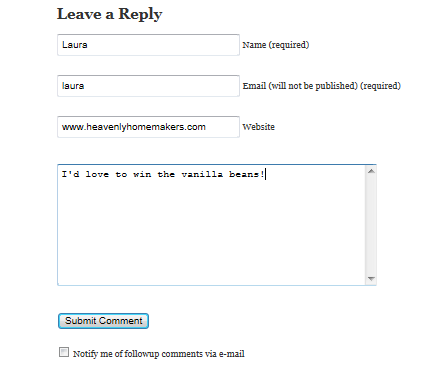
Here’s what my completed form might look like just before I hit submit:
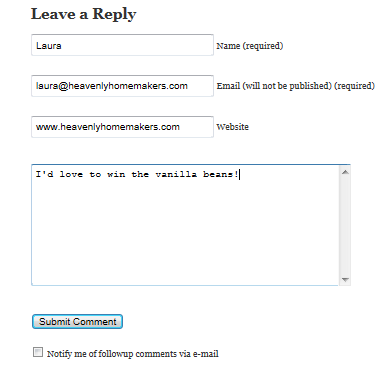
Take note: You can click on “Notify me of followup comments via e-mail” ONLY if you want to receive an automatic email every time someone leaves a comment on this particular post. This is a helpful feature if you are enjoying the discussion on the topic of this blog post. But if you click that on a giveaway post, you’re likely to get hundreds of emails full of comments saying “I’d love to win vanilla beans” and it may get annoying after a while. (If you run into this problem, no worries. You can email me and I can fix it!)
So there you go – that’s how to leave a comment here at Heavenly Homemakers.
I also wanted to take a moment to clear up any confusion on How to Enter a Giveaway here at Heavenly Homemakers. Often I have subscribers who simply click “reply” on the daily email newsletter that comes to their inbox and tell me via that email that they’d like to win. Unfortunately, I am unable to count those responses because they get lost in my full inbox. To enter a giveaway, you MUST click over from the email newsletter to the actual post on this website and enter a comment as directed above.
Any questions? Leave a comment (it’ll be good practice!) here and I’ll try to give you an answer!!! :)